
666C Withdrawal

Introduction
666C Withdrawal is the process of moving your winnings from the 666C balance to your mobile wallet. The app sends cash-outs to JazzCash or EasyPaisa, so Pakistani users can receive money without a bank card. However, withdrawals involve more checks than deposits, which is why some requests take longer. For example, the app may verify your wallet name, bonus wagering, and account activity first. This guide explains each step in simple English, so your first withdrawal goes smoothly. Moreover, it covers limits, processing times, and fixes for pending or rejected requests. Read it before you play, because a few early choices decide how easily you can cash out later.
What Do You Need Before Withdrawing from 666C?
Most withdrawal problems start long before the user taps the Withdraw button. Therefore, check these requirements first so your request does not get stuck:
- A verified 666C account: Your mobile number must be confirmed through OTP.
- A wallet in your own name: JazzCash or EasyPaisa details should match your account.
- A withdrawal password: Many apps ask you to set this extra security code first.
- Completed wagering: Any bonus you claimed may need a set amount of play first.
- Enough withdrawable balance: Your cash balance must meet the minimum amount.
- The latest app version: Older versions may fail when you submit a request.
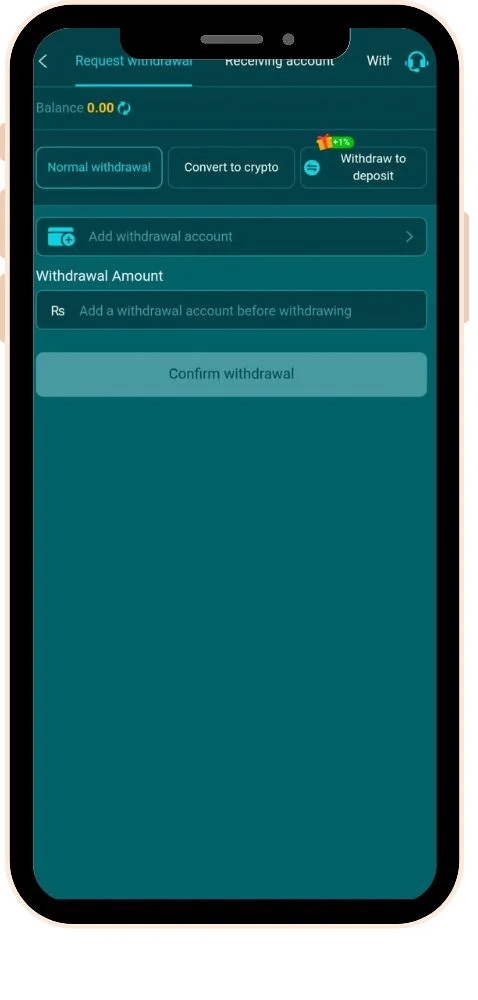
How to Bind Your JazzCash or EasyPaisa Account?
Before your first withdrawal, you must link the wallet that will receive your money. You usually do this only once, so take a moment to get every detail right.
- Open your profile or wallet: Look for Bank Card, Wallet, or Withdrawal Account.
- Tap Add Account: Choose JazzCash or EasyPaisa as the method.
- Enter the account holder name: Type the name exactly as it appears on your wallet.
- Enter the wallet number: Double-check every digit before saving.
- Confirm with OTP or password: Verify the change to finish linking.
How to Withdraw Money from 666C Step by Step?
Once your wallet is linked and your balance is ready, the request takes only a minute. Follow these steps:
- Log in to 666C: Open the app and sign in to your account.
- Go to Withdraw: Tap Withdraw inside your wallet or profile section.
- Check withdrawable balance: Make sure the amount shown is available for cash-out.
- Select your linked wallet: Choose your JazzCash or EasyPaisa account.
- Enter the amount: Type an amount within the minimum and maximum limits.
- Review any fee: Check whether the app shows a charge for this withdrawal.
- Enter your withdrawal password: Confirm the request securely.
- Submit the request: Tap Withdraw and note the request ID or order number.
- Track the status: Check your withdrawal history for updates.
- Confirm receipt: Look for the incoming payment SMS from your wallet.
What Is the Difference Between Total Balance and Withdrawable Balance?
Many new users get confused when the Withdraw screen shows less money than their total balance. This happens because 666C may separate bonus money from real cash. Your total balance can include deposits, winnings, and unconverted bonus funds together. In contrast, your withdrawable balance shows only the money you can cash out right now. Bonus funds usually become withdrawable after you complete their wagering requirements. Therefore, always check the withdrawable figure before you plan a cash-out.
How Do Wagering Requirements Affect Your Withdrawal?
A wagering requirement is the amount you must play before bonus money becomes cash. For example, a bonus might require you to bet several times its value first. Until you complete this, the app may block or reduce your withdrawal. The exact rules differ for each offer, so read them on the Events or Rewards page. If you want fast and simple cash-outs, consider skipping bonuses at 666C deposit time. That way, your withdrawable balance stays clear and easy to understand.
How Long Does a 666C Withdrawal Take?
Processing time varies, so no fixed time applies to every request. Smaller withdrawals often arrive quickly, while larger or first-time requests may go through extra review. The table below explains what each status usually means.
| Withdrawal Status | What It Means | What You Should Do |
| Pending | Request received and waiting in the queue | Wait patiently and avoid duplicate requests |
| Under Review | The app is checking account or bonus activity | Make sure your wallet details are correct |
| Processing | Payment is being sent to your wallet | Watch for an SMS from JazzCash or EasyPaisa |
| Successful | Money has been sent | Check your wallet balance to confirm |
| Rejected | The request failed a check | Read the reason, fix it, then submit again |
Why Is My 666C Withdrawal Pending or Rejected?
A delayed withdrawal can be frustrating, but most cases come from a few common causes. Use this table to find and fix the issue quickly:
| Problem | Likely Cause | Quick Fix |
| Withdrawal rejected | Wallet name does not match account | Bind a wallet registered in your own name |
| Withdraw button disabled | Wagering not complete | Finish the bonus turnover, then try again |
| “Amount below minimum” | Request too small | Enter at least the minimum amount shown |
| Pending for a long time | Manual review or busy period | Wait, then share your request ID with support |
| Status successful, no money | Wrong wallet number linked | Contact support with the request ID straight away |
| “Withdrawal password incorrect” | Wrong or forgotten code | Reset it through your profile security settings |
How to Keep Your 666C Withdrawals Safe?
Withdrawals attract scammers because they involve real money leaving your account. Fortunately, a few simple habits keep your winnings protected:
- Never pay to “unlock” a withdrawal: Genuine platforms do not ask for fees through private chats.
- Ignore fake support accounts: Use only the customer service button inside the official app.
- Never share your OTP or passwords: Real staff will never request them.
- Keep one personal account: Multiple accounts can lead to frozen balances.
- Withdraw winnings regularly: Cash out part of your profit instead of replaying it all.
- Save request IDs: They help support find your transaction quickly.
Conclusion
Overall, 666C withdrawal is straightforward once your account is set up correctly. You bind a JazzCash or EasyPaisa wallet in your own name, enter an amount, and confirm your request. Most delays come from name mismatches, unfinished wagering, or amounts below the minimum. Moreover, understanding the gap between total and withdrawable balance prevents a lot of confusion. If a request stays pending, your request ID and in-app support usually resolve it. Above all, never pay anyone outside the app to release a withdrawal.
Still, remember that winnings on 666C Game are never guaranteed, because every game depends on chance. Therefore, treat any cash-out as a bonus from entertainment, not as regular income. Set a budget, withdraw part of your winnings regularly, and avoid replaying everything you win. Also, check the laws that apply to you, and use the app only if you are 18 or older.
FAQs
Can I withdraw my 666C winnings to a bank account?
666C mainly sends withdrawals to JazzCash and EasyPaisa wallets. After the money arrives, you can move it from your wallet to your bank account. Check the withdrawal screen in case the app adds new methods.
Can I cancel a 666C withdrawal after submitting it?
Some apps allow cancellation while the request still shows as Pending. Once processing starts, cancellation is usually not possible. If you need to cancel, contact customer support as early as possible.
Why did my withdrawal amount arrive lower than expected?
The app or your wallet provider may apply a small fee. In other cases, part of your balance may have been bonus money that was not withdrawable. Check your withdrawal record and contact support if the numbers do not match.
Is there a limit on how many times I can withdraw?
Many platforms set daily limits on the number or total value of withdrawals. These limits may also change with your VIP level. Check the withdrawal screen for the current rules on your account.